
SqlServer 2012 – Cannot access the specified path or file on the server

Avete ricevuto l’errore riportato sotto e siete in un ambiente cluster ?
Avete modificato i dischi o tolto e rimesso delle risorse al servizio cluster MsSql ?

TITLE: Locate Database FilesSVDB2012S0

M:\MSSQL11.MSSQLFF\MSSQL\Backup
Cannot access the specified path or file on the server. Verify that you have the necessary security privileges and that the path or file exists. If you know that the service account can access a specific file, type in the full path for the file in the File Name control in the Locate dialog box.

Or

System.Data.SqlClient.SqlError: Cannot use file for clustered server. Only formatted files on which the cluster resource of the server has a dependency can be used. Either the disk resource containing the file is not present in the cluster group or the cluster resource of the Sql Server does not have a dependency on it. (Microsoft.SqlServer.SmoExtended)

Soluzione:

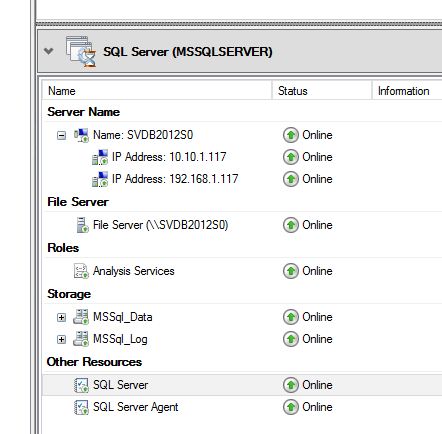
Il problema potrebbero essere le dipendenze. Se guardate nelle risorse del servizio in cluster di SqlServer, vedrete le varie risorse: Server, Network, Storage e SQL Server e SQL Server Agent. Bene, l’errore nel mio caso era scatenato dal fatto che il servizio SQL Server partiva prima dello storage e quindi non riusciva ad accedervi poichè non lo vedeva come una risorsa disponibile. Poco importa se partiva un millisecondo dopo e se il sistema operativo host poteva accederci…
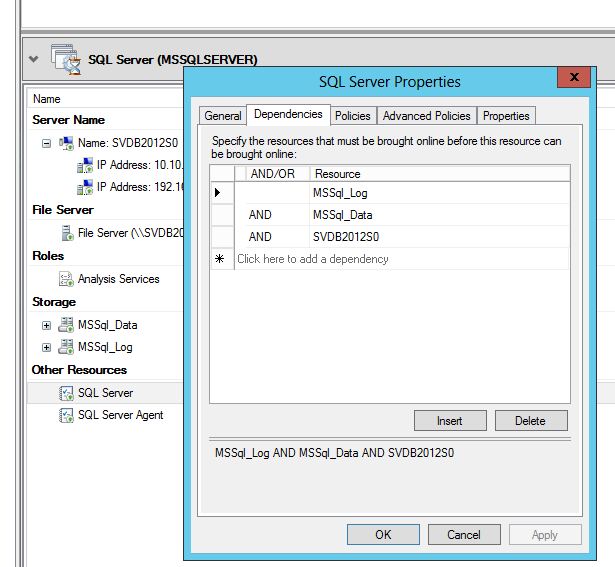
Per sistemare il problema dovete cliccare con il tasto dx sul servizio SQL Server e impostare le Dependency aggiungendo i due dischi dello storage.
In questo modo, quando farete partire il cluster di SQLServer, lui farà partire prima i dischi dello storage e poi il servizio SQL Server che, questa volta, troverà correttamente la disponibilità della risorsa e tutto funzionerà correttamente !
Pubblicato in SqlServer | Contrassegnato , , , , , , , | Lascia un commento

ActiveDirectory: Update ExtensionAttribute with PowerShell

Updating ExtensionAttribute with a single command and with ActiveRoles Management Shell for Active Directory… it’s very easy:

Example:
Get-QADUser -SearchRoot ‘OU=Unit,DC=Domain’ -objectAttributes @{extensionAttribute1=”value”} | Set-QADUser -objectAttributes @{extensionAttribute2=”newvalue”}

Only users with email:

Get-QADUser -SearchRoot ‘OU=Unit,DC=Domain’ -objectAttributes @{extensionAttribute1=”value”} -LdapFilter ‘(mail=*)’ | Set-QADUser -objectAttributes @{extensionAttribute2=”newvalue”}


Pubblicato in ActiveDirectory | Contrassegnato , , | Lascia un commento

Solo una moda ?

Pubblicato in Marketing, Varie | Contrassegnato | Lascia un commento

Social And Digital Marketing

Pubblicato in Marketing, Varie | Contrassegnato | Lascia un commento

Vodafone ci vede bene

Trovato, o meglio, visto…
sul sito della Vodafone.

Vodafone [Non vedenti]

Pubblicato in Varie | Lascia un commento

>>> Shift right zero fill – C#.Net porting

Ho passato un po’ di tempo a cercare in .Net una soluzione per tradurre l’operatore >>> usato in javascript.
Non l’ho trovata.

Allora mi sono scritto una piccola funzione che fa la stessa cosa ma deve essere modificata se la variabile è un Int32 oppure un Int64. Preferibilmente utilizzerei UInt32 / UInt64.
La modifica da fare è cambiare la costante 32 o 64.

La funzione “Shift right zero fill” a differenza dello shift right comune ( >> ), aggiunge 0 a destra del numero binario. Anche >> aggiunge 0 ma solo se il numero è positivo…

Questa funzione non fa altro che :

  • Fare il right bit shift comune ( >> )
  • Comporre una maschera di bit con tanti zero a dx quanti sono i bit shiftati e il resto della maschera a 1, e poi fare un AND logico.

la funzione è la seguente:

        private UInt32 shiftrZeroFill(UInt32 number, Int32 bits) {
            UInt32 p = UInt32.MaxValue;
            UInt32 r = ~((p >>= (32 - bits)) << (32 - bits));
            return (number >> bits) & r;
        }
Pubblicato in .Net | Contrassegnato , , , , | Lascia un commento